Login with Facebook

Thursday, December 11, 2014

Working with Alerts in HP Operations Analytics

HP Operations Analytics now enables you to create alerts based on metric and log data. you can specify the conditions of the alert, allowing you to proactively monitor known issues and prevent escalations. This video shows you the basic steps of creating an alert by showing you one use case.

image

To learn more about HP Operations Analytics visit: http://www8.hp.com/us/en/software-solutions/operations-analytics-operations-analysis/index.html

Wednesday, December 10, 2014

HP OMi: How to connect an HP Operations agent

In this video, you will learn how to connect an HP Operations agent to OMi so you can monitor availability and performance and remediate issues on a monitored server.

image

OMi is the only product that dynamically and automatically discovers and correlates—even as the environment changes—three sets of data: event data that indicates infrastructure- or service-impacting issues, for more details check OMi data sheet  http://h20195.www2.hp.com/V2/GetDocument.aspx?docname=4AA2-3879ENW&cc=us&lc=en

Sunday, November 30, 2014

HP vPV YouTube videos

Virtualization Performance Viewer (vPV) Overview | HP

http://youtu.be/YDb5_bNwhms

HP vPV - Quickly identify performance bottlenecks in virtualized environment

http://youtu.be/fnBK7VMLjd8

HP vPV - One tool; Many environments - Vendor neutral design

http://youtu.be/fu7_Wlq3BdM

HP vPV - Perform rapid triage analysis and troubleshoot problems in virtualized environment using the workbench

http://youtu.be/hSAtSHGUfgY

HP vPV - Advanced performance troubleshooting using Real Time Guest OS Drilldown

http://youtu.be/xnuOb07A3Sk

HP vPV - Discover means to optimize & right size the virtualized environment

http://youtu.be/G56oafzOr9o

HP vPV - VM placement recommendations for new virtual machines

http://youtu.be/0rEKal0H870

HP vPV - Using vPV to resolve performance problems in OpenStack environment

http://youtu.be/Mdne06aABp8

HP vPV - An overview of out-of-the-box reports offered by vPV

http://youtu.be/UCjtSIFshAI

HP vPV - Getting started with vPV

http://youtu.be/wYnmA_DuBKk

HP vPV - Detect and resolve performance anomalies using alerts

http://youtu.be/IMEpeIVaIbg

HP vPV - Capacity planning made easy with utilization forecast

http://youtu.be/wg-_zeKTP6I

HP vPV - Integrated capacity planning and provisioning in virtual datacenters

http://youtu.be/qodmrrKVua8

HP vPV - Improve the operational efficiency of the virtual infrastructure in the cloud      

http://youtu.be/v3MKOiI8B7E

HP vPV - Capacity planning through what-if modelling and analysis          

http://youtu.be/TpCa_K3we6s

image

image

image

Note: All vPV videos are now listed in this YouTube Playlist.

Wednesday, March 5, 2014

Topology Based Correlation using OMi

“I have to write any article to my blog, I have to get back to my audience” this is what consumes my mind during the last year. Although I hadn’t wrote any articles but I had a wonderful challenging year. From time to time, I write articles but they are always saved in the draft.

So it is the time to be back again.

I have a test lab and I had seen some messages that was generated from my domain controller but those events should be taken care by many team; supposing we are in real scenario.

I have disk capacity issue in dive C where Active Directory DIT files are stored.
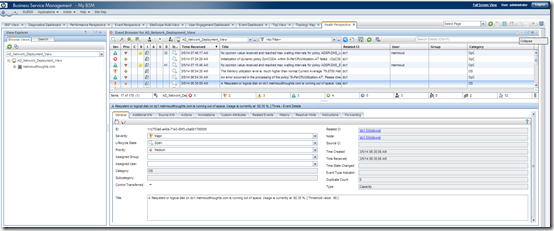
image

At the same time, the Active Directory team is monitoring domain controller with Active Directory related policies and they have been alerted with the below events.

image

We need to tell both admins which event are root cause and which event are symptoms.

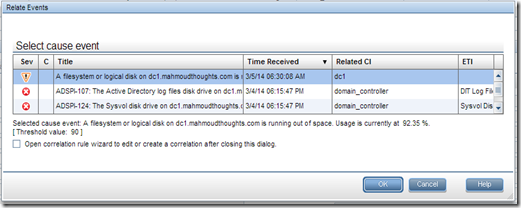
I will select the four alerts and Click on “Relate Events”

image

Select the identified Root event.

image

You can see now the event are categorized as root and symptoms under (C)orrelation column.

image

When you open any of the events you can see the correlation on “Related Events” tab.

image

What I have just done, is just manual correlation.

I have apply the same concept but with automation based on OMi topology based event correlation which Checks the events associated with Health Indicators against Topology relations as in our case we have filesystem connected with node that hosts domain controller. So if events with HI associated with FileSystem and other events with HIs associated with DomainController the can be correlated with the presence of TBEC rule as below.

I will select the events that has the HIs as below.

Note: I have selected one more event related to Node, to ensure that I will have the right topology relations


image

Then Identified the root cause event.

image

Give the Rule Name and description


image


It is just fun to create correlation rules, and you can let your operators focus on root cause events.

Monday, December 2, 2013

Disable User Account Control in Windows Server 2012 R2

I have recently tried to install application that require UAC to be disabled, I am using Windows Server 2012 R2.

I have launched “User Account Control Settings” from the control panel and selected the lower level.

UAC

I have restarted the Windows, even that it didn’t requested but I realized that it is still disabled, so I found on one of the articles that you have to disable it manually using the registry  modification.

registry

Just change value of EnableLUA  from 1 to 0 in "HKEY_LOCAL_MACHINE\SOFTWARE\Microsoft\Windows\CurrentVersion\policies\system".

restartwarning

We can use command line for not opening the registry editor by typing the command below:

reg add HKEY_LOCAL_MACHINE\SOFTWARE\Microsoft\Windows\CurrentVersion\policies\system /v EnableLUA /t REG_DWORD  /d 0 /f 
 

Friday, July 27, 2012

Having Wireless Bluetooth in Windows 7

I have HP laptop and I purchased a new Bluetooth Jebra and I was trying to connect it to Windows 7 and it was connected but no sound is getting out of Jebra.

I investigated and I found that Microsoft is not supporting Wireless Bluetooth by default, you have to install vendor specific drivers.

Anyway, I found HP driver for Wireless Bluetooth in this link and  I am happy now I can listen to my Computer sound from this new Jebra.


Windows 7 driver.

ftp://ftp.hp.com/pub/softpaq/sp48501-49000/sp48538.exe


I found this file also but I did not install it but in case you need

ftp://ftp.hp.com/pub/softpaq/sp47001-47500/sp47022.exe

When pairing with Jebra,  drivers are identified automatically.

image

Bluetooth details page:

image

Tuesday, July 24, 2012

Creating Database on mySQL for HP OO

During HP OO installation, you will be asked for which database to use for HP OO Central.

If you choose to use mySQL

You have to Install mySQL on remote or Local machine and create the database and user that have full access to this database.

Here below are the commands needed to prepare mySQL for HP OO installation

start mySQL client


CREATE DATABASE dharma;

GRANT ALL ON dharma.* to dharma_user@localhost IDENTIFIED BY 'password';

The first command creates database named dharma

The second command creates user with full access to dharma db named dharma_user with password is password


image