Login with Facebook
Showing posts with label Windows Server 2008. Show all posts

Saturday, May 2, 2009

1- What is WMI?

As, I promised I will try to give you a solid background about Windows Management Instrumentation WMI.

I will write multiple articles with the name of What is WMI. I will start by start by Microsoft Management Console ending by WS-management in Windows server 2008 and its R2

In this article I will tell you mainly about today’s Microsoft Management Technology like Powershell and WMI, but this will be later in this topic.

Early Microsoft Management Technologies:

I will first describe Microsoft strategies in Management, I will start in late January 1998 when Microsoft released Microsoft Management Console (MMC) where it is a main Console and the developers create their applications as a part of the console or what we name is a snap-in, I think MS main concern is to facilitate administration interfaces and to combine them into one interface, and MS introduced IIS version 4 as a part of  Microsoft Windows NT 4 Option Pack to be Full MMC complaint application and to contain all the snap-ins for (web service and FTP and other components)

If you remember when we were using Windows NT 4 administrative tools, where the way to access the application manu  is inconsistent where you fine the menu is file, edit, view and for other application is user, view, tools and so on

Microsoft Management strategies in those old days was wonderful where you unify management in a single console with context menus.

U6 ntsvtl11  
User Manager for Domain- the main Domain users and group management Server Manager – Used to manage computer accounts
Services application – for start and stop  system services
 

Win2kDefrag In windows Server 2000 Microsoft released MMC version 1.2 where is supports group policy management and user account snap-ins plus other features you may fine in Wikipedia.


You can fine Microsoft definition for MMC in MSDN

The Microsoft® Management Console (MMC) component is a framework for administering Microsoft Windows®-based environments. MMC provides a simple, consistent, and integrated administration user interface and administration model.

You can use MMC to create, save, and open administrative tools, called consoles, which manage the hardware, software, and network components of your Windows system. If an application uses MMC to host its management tasks, then the application provides a console with snap-ins, which are dynamic-link libraries (DLLs). Event Viewer is an example of an application using the MMC framework in this way.
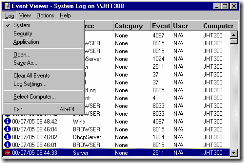
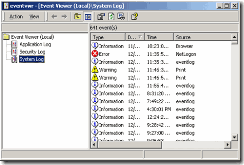
ntsvtl07 Bb742446_event_viewer(en-us,TechNet_10)
Event Viewer in Windows NT 4 Event Viewer in Windows 2003 / XP

Step-by-Step Guide to the Microsoft Management Console

In Microsoft April 2003 release Windows Server 2003 which incloded with MMC version 2.

in Microsoft released Windows 2003 R2 which supports natively MMC version 3, the two main features are A new pane called the actions pane is available; It displays available commands for the selected node and Functionally rich views can be created using one of the four available view types: list, Windows Forms, HTML, and message like below System Center Configuration Manager 2007 SCOM summary web pages inside the console.

image

see you next article.

Friday, February 27, 2009

System Center Virtual Machine Manager 2008 Warning Message about Hyper-V Hosts

After you install VMM 2008 and deploy the agent to your Hyper-V Boxes, you will see that the server status is Needs Attention

image

I’ve searched “Googled” the internet and found that there is two missing updates for Hyper-V boxes.

  • BITS update.
  • GUID drives in Hyper-V.
  • Thursday, February 26, 2009

    Enable Aero Interface in Windows Server 2008

    you may know the process of converting MS Windows Server products to be used as Desktop Client, but if you follow your knowledge in converting from Windows Server 2003 to Workstation. You may be able to get the Windows Vista Basic interface without the glass effect of Aero.

    the trick is resides in going to Control Panel—> Personalization --->Windows Color and Appearance

    choose the Color scheme of Windows Aero  not Windows Vista Basic

     ServerManager


    themes1 


    themes2 

    themes3 

    themes4 

    themes5

    themes6


    image

    Thursday, August 21, 2008

    Windows Small Business Server 2008 exam vouchers

    Microsoft has posted on their SMB Community Blog a limited quantity of Windows Small Business Server 2008 exam vouchers.  Act fast by sending a request to askcorp@microsoft.com. 

    regarding whether or not that test would count towards competency requirements since it is a beta test. Well, I confirmed with the certifications teams and they have made it official, yes, Beta exams DO count towards competency requirements. So use those free exam vouchers in full confidence that by passing the exam, your efforts will count towards your competency requirements.

    Enjoy free exams!!!

    regards,

    Mahmoud Ibrahim from Al-Sadd Suites, Doha, Qatar

    Map image

    Monday, August 11, 2008

    MCSE 2003 TO MCITP

    Three exams to transition to MCITP – Enterprise Administrator

    1. Exam 70-649: TS: Upgrading Your MCSE on Windows Server 2003 to Windows Server 2008, Technology Specialist
    2. Exam 70-620 (earns MCTS: Windows Vista Configuration) or Exam 70-624 (earns MCTS: Business Desktop Deployment)
    3. Exam 70-647: PRO: Windows Server 2008, Enterprise Administrator

    image

    in case you like to obtain MCITP - Server Administrator, one exam is needed plus the upgrade Exam 70-649 listed above:

    1. Exam 70-646: Pro: Windows Server 2008, Server Administrator

    image

    MCITP: Server Administrator on Windows Server 2008

    if you planning to take the MCITP: Server Administrator on Windows Server 2008

    MCITP-SA

    You need to pass three exams:

    1. Exam 70-640 (earns MCTS: Windows Server 2008 Active Directory Configuration)
    2. Exam 70-642 (earns MCTS: Windows Server 2008 Network Infrastructure Configuration)
    3. Exam 70-646: Pro: Windows Server 2008, Server Administrator

    Review the preparation guide for Exam 70-640: TS: Windows Server 2008 Active Directory, Configuring
    Review the preparation guide for Exam 70-642: TS: Windows Server 2008 Network Infrastructure, Configuring
    Review the preparation guide for Exam 70-646: Pro: Windows Server 2008, Server Administrator

    Friday, August 1, 2008

    Learn about Microsoft Certifications

    Microsoft Certification structure

    • CertStructure_lgTechnology Series: Specialist certifications train IT professionals in implementation, building, troubleshooting, and debugging of a specific Microsoft technology.

    • Professional Series: Professional credentials validate the skill set required for a particular job.

    • Master Series: Master certifications identify individuals with the deepest technical skills available on a particular Microsoft product.

    • Architect Series: The Certified Architect program makes it easy for companies to identify experienced IT architects who have completed a rigorous peer review process.
      Microsoft certification website

    Free Beta exam 71-654: TS: Windows Essential Business Server 2008, Configuring

    You are invited to take beta exam 71-654: TS: Windows Essential Business Server 2008, Configuring. If you pass the beta exam, the exam credit will be added to your transcript and you will not need to take the exam in its released form. The 71-xxx identifier is used for registering for beta versions of MCP exams, when the exam is released in its final form the 70-xxx identifier is used for registration.
    By participating in beta exams, you have the opportunity to provide the Microsoft Certification program with feedback about exam content, which is integral to development of exams in their released version. We depend on the contributions of experienced IT professionals and developers as we continually improve exam content and maintain the value of Microsoft certifications.

    71-654: TS: Windows Essential Business Server 2008, Configuring counts as credit towards the following certification(s).

    · MCTS: Windows Essential Business Server 2008, Configuration


    Availability

    Registration began: July 22, 2008

    Beta exam period runs: July 22, 2008– August 12, 2008

    Receiving this invitation does not guarantee you a seat in the beta; we recommend that you register immediately. Beta exams have limited availability and are operated under a first-come-first-served basis. Once all beta slots are filled, no additional seats will be offered. However, the beta dates may be extended to meet the requisite number of candidates.

    Testing is held at Prometric testing centers worldwide, although this exam may not be available in all countries (see Regional Restrictions).  All testing centers will have the capability to offer this exam in its live version.

    Regional Restrictions: India, Pakistan, China


    Registration Information

    You must register at least 24 hours prior to taking the exam.
    Please use the following promotional code when registering for the exam: EBS08
    Receiving this invitation does not guarantee you a seat in the beta; we recommend that you register immediately.

    To register in North America, please call:

    •Prometric: (800) 755-EXAM (    800-755-3926        )Outside the U.S./Canada, please contact:

    •Prometric: http://www.register.prometric.com/ClientInformation.asp