
Monday, August 2, 2010


US government approves Jailbreak for Iphone, today Jailbreak for iOS 4.0 and 4.0.1 is release
http://www.washingtonpost.com/wp-dyn/content/article/2010/07/26/AR2010072602813.html
Comex (the creator of Spirit ) has released browser based jailbreak for iOS 4.0 and iOS 4.0.1
this time is the easiest it is done from the iPhone itself
Open Safari,
open www.jailbreakme.com
then slide the the button to jailbreak

That’s it.
If you have issue in installing it like you stuck with the purple screen please use the below steps.
Step 1: Navigate to Settings –> Safari and then clear out History, Cookies and Cache.
Step 2: Reboot your iOS device by turning it off, and then back on.
Step 3: Now try http://jailbreakme.com or http://jailbreakme.modmyi.com again.
Sunday, August 1, 2010
Upload picture in Outlook 2010 using the Exchange Management Shell (Exchange 2010)
This article is just for assisting anyone would like to have employees picture to be displayed in different areas like Active Directory, SharePoint, or exchange.


http://msexchangeteam.com/archive/2010/03/10/454223.aspx
http://bink.nu/news/gal-photos-in-exchange-2010-and-outlook-2010.aspx
http://www.moe.am/index.php/2009/03/pictures-in-active-directory-users-and-computers/
How To Manipulate the ThumbNailPhoto Attribute of a User Object in the Active Directory
http://support.microsoft.com/kb/q292029/
Friday, July 30, 2010
NNMi Failed to start after finishing installation successfully
Draft Article
I know the title may be weird, but this is exactly what happens when I tried to install NNMi 8.10 and its database is a remote Oracle 10.2.0.4 although the oracle version does not matter, but this is just for info.
the steps as per the guide was to create a user with sufficient privilege which is stated clearly to be
Create sequence;
Create session;
Create table
Create view
FLASHBACK ANY TABLE
although I have all these configured but I got an 404 error on the quicklaunch website and all NNMi websites.
Anyway, I checked the logs (jbossserver.log) and I found error related to tables or views could not be found, I checked the oracle server and I found there is no table created by NNMi user.
the problem was the tablespace quota assigment to NNMI user, if you create the user account using the sqlplus you can use below commands:
alter user <user_name> quota unlimited on <tablespace_name>; alter user <user_name> quota 1M on <tablespace_name>;
Saturday, July 24, 2010
Moving from NNMi using Postgres to NNMi with Oracle
This is a Draft Article
I just want to share my experience related to the migration from NNMi using local DB (postgress) to NNMi using Oracle DB
System was as specified:
NNMi 9.00 with Patch 1
Same Machine hosting the Embedded database (postgress)
Objective:
Migrate the configuration data to NNMi and Oracle Database.
Step X Backup NNMi for disaster recovery
nnmbackup.ovpl –type offline –scope all –force –archive –target c:\
a file with tar extension will be created on drive c:\ started nnm-bak- and the current date and time .tar like nnm-bak-20100721183731.tar
Extra-Step X Backup any custome scripts you created for Incident actions.
%NnmDataDir%\shared\nnm\actions
aslo these files can be found under your backup archive
nnm-bak-20100721183731.tar\nnm-bak-20100721183731\data\shared\nnm\actions
Step X Backup you configuration (configuration Export)
in this step we will export the configuration using nnmconfigexport.ovpl
nnmconfigexport.ovpl –c all –file c:\exportedconfig
Hint: the export export remember to create the folder before run the above command “mkdir c:\exportedconfig”
Step X export Nodes as seed file
Step X Remove current NNMi installation
1st - Remove i-SPI
2nd – Remove Patches
3rd – Remove NNMi
Restart your server.
Step X Oracle configuration
In this section we will create the table space that will hold the NNMi database that will be created during NNMi installation.
Section 1: Create Tablespace
CREATE SMALLFILE
TABLESPACE "NNMI"
LOGGING
DATAFILE 'H:\ORADATA\NNMIDB\NNMI01.dbf' SIZE 4096M,
'H:\ORADATA\NNMIDB\NNMI02.dbf' SIZE 4096M,
'H:\ORADATA\NNMIDB\NNMI03.dbf' SIZE 4096M EXTENT MANAGEMENT
LOCAL SEGMENT SPACE MANAGEMENT AUTO
Section 2: Create NNMi User
CREATE USER "NNMI" PROFILE "DEFAULT"
IDENTIFIED BY "nnmi" DEFAULT TABLESPACE "NNMI"
TEMPORARY TABLESPACE "TEMP"
ACCOUNT UNLOCK;

GRANT CREATE ANY INDEX TO "NNMI" ;
GRANT CREATE ANY SEQUENCE TO "NNMI" ;
GRANT CREATE ANY TABLE TO "NNMI" ;
GRANT CREATE ANY VIEW TO "NNMI" ;
GRANT CREATE SEQUENCE TO "NNMI";
GRANT CREATE SESSION TO "NNMI" ;
GRANT CREATE TABLE TO "NNMI" ;
GRANT CREATE VIEW TO "NNMI" ;
GRANT FLASHBACK ANY TABLE TO "NNMI" ;
GRANT "CONNECT" TO "NNMI";
GRANT "OEM_ADVISOR" TO "NNMI";
GRANT "RESOURCE" TO "NNMI";

Step X Install NNMi 9.x
Install using the installation guide.
Step X Load old node list a seed files
Step X Load Node Groups and Maps information
1- load Nodegroup Map configuration
loading Nodegroup Map configuration will fail as per the screenshot but some required identification are imported that facilitate the nodegroup import
D:\Program Files (x86)\HP\HP BTO Software\bin>nnmconfigimport.ovpl -f C:\export
edconfig\ngmap.xml
2- Load nodegroup configuration
D:\Program Files (x86)\HP\HP BTO Software\bin>nnmconfigimport.ovpl -f C:\export
edconfig\nodegroup.xml
Successfully imported nodegroup.xml.
3- load Nodegroup Map Configuration again
D:\Program Files (x86)\HP\HP BTO Software\bin>nnmconfigimport.ovpl -f C:\export
edconfig\ngmap.xml
Successfully imported ngmap.xml.
Friday, July 23, 2010
IITRC Comparing databases NNM 7.5 with NNMi 8.x 9.x
http://forums11.itrc.hp.com/service/forums/questionanswer.do?threadId=1439068
In the NNM database
As Object database in 7.5, the below tables are used in NNMi
Object database which contains nodes, interfaces and IP addresses are located in the following tables
| Function | Table name |
| Node list | NMS_NODE |
| Interfaces list | NMS_IFACE |
| IP Addresses list | NMS_IP_ADDR |
As Topology database in 7.5, the below tables are used in NNMi:
| Function | Table name |
| Nodes connection | NMS_L2CONN |
For MAP database in 7.5 there is the below tables in NNMi:
| Function | Table name |
| Nodes location (X,Y) in the different maps | NMS_MAP_VIEW_PIN |
| Node Groups which are considered Maps in NNMi | NMS_NODE_GROUPS |
As Event Database in 7.5 the below tables are used in NNMi:
| Function | Table name |
| Incidents | NNM_INCIDENTS |
| Other tables related to Incidents | NMS_INCIDENT_* tables |
The Trend database is NNMi SPI for Performance (Performance iSPI)
Saturday, June 26, 2010
Import Configuration from NNMi 8.X to 9.x : Part 1
In this article I am just giving example of on of the configuration setting that can be exported from NNMi 8.x to NNMi 9.x
Node Groups “nodegroup.xml” file contains nodegroup information in XML format, in NNMi 9.x there one more attribute is needed in the xml file which is not part of the export details
<ns2:calculateStatus>true</ns2:calculateStatus>
Open in Wordpad nodegroup.xml
From edit menu –> replace
in find what <ns2:additionalNodes/> and in replace with write <ns2:additionalNodes/> <ns2:calculateStatus>true</ns2:calculateStatus>
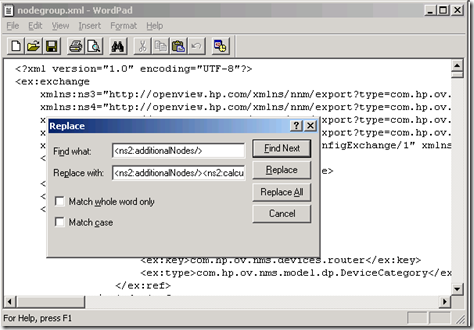
Note: I have used find and replace (as stated above "to search forand to replace it with the same tag plus the line needed" )to make it easy in adding the tag as bere the example below I have highlighted this line just to clarify that this is the only addition needed.
Node Groups “nodegroup.xml” file contains nodegroup information in XML format, in NNMi 9.x there one more attribute is needed in the xml file which is not part of the export details
<ns2:calculateStatus>true</ns2:calculateStatus>
Open in Wordpad nodegroup.xml
From edit menu –> replace
in find what <ns2:additionalNodes/> and in replace with write <ns2:additionalNodes/> <ns2:calculateStatus>true</ns2:calculateStatus>

Note: I have used find and replace (as stated above "to search for
<ns2:nodeGroup>nnmconfigimport.ovpl -u system -p password -f nodegroup.xml
<ns2:addToPerfSPIReports>true</ns2:addToPerfSPIReports>
<ns2:addToViewFilterList>true</ns2:addToViewFilterList>
<ns2:additionalNodes/> <ns2:calculateStatus>false</ns2:calculateStatus> <ns2:children/>
<ns2:filterExpressions/>
<ns2:name>APC (American Power Conversion)</ns2:name>
<ns2:nodeDeviceFilters>
<ns2:item>
<ex:ref>
<ex:key>40e2ab16-e401-492f-88e0-88f81cb0c6c9</ex:key>
<ex:type>com.hp.ov.nms.monitoring.groups.model.NodeDeviceFilter</ex:type>
</ex:ref>
</ns2:item>
</ns2:nodeDeviceFilters>
<ns2:parents/>
<ns2:type>USER</ns2:type>
<ns2:uuid>74e4ddba-9e82-4e91-a660-9b8f6fe4c267</ns2:uuid>
</ns2:nodeGroup>
Subscribe to:
Posts (Atom)